Templates for Keynote: 153+ Resources
EpicPxls offers 153+ curated templates for Keynote, all with a commercial license and editable source files (Figma, Sketch, PSD). We have 153+ templates compatible with Keynote, tested and verified for seamless integration.
Last updated February 12, 2026
Discover 153+ handpicked templates for Keynote.
Trusted by designers at leading companies
Top Templates for Keynote
Handpicked resources from our curated collection


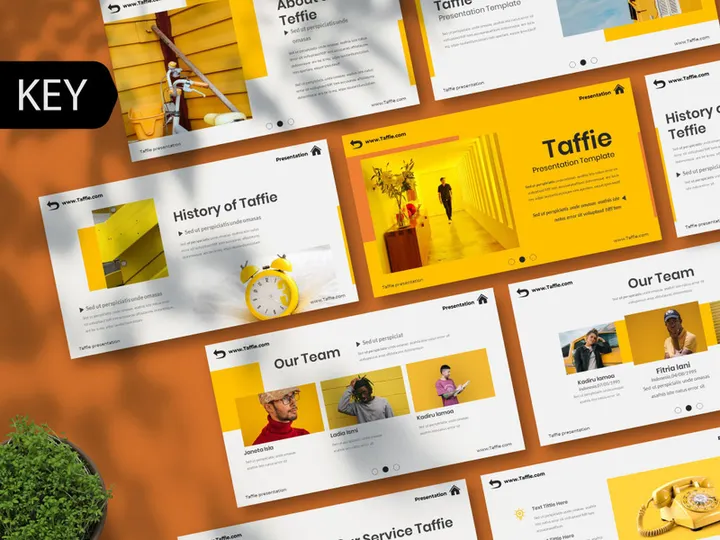
![Linear Infographic Template [Free] preview picture](https://imgproxy.epicpxls.com/pLbPbApgh3RaxZemmAAVKbS5LpmnM62vACT5ZWOegpU/rs:fill:720:540:0/g:no/aHR0cHM6Ly9pdGVt/cy5lcGljcHhscy5j/b20vdXBsb2Fkcy9w/aG90by9mMzFhZmI1/NDU3YmUyMTg4ZjZj/MGI2MTMxOGVhYTBk/Zg.jpg)




Try Our Free Resources
Download any of these for free - no account required

Why Keynote for Templates?
Keynote has emerged as a powerful and intuitive presentation tool, especially for users embedded in the Apple ecosystem. Its seamless integration with macOS and iOS devices makes it a go-to choice for individuals and teams looking to create polished, professional presentations with minimal friction. One of the most compelling reasons users gravitate toward Keynote is its robust support for templates. These pre-designed layouts streamline the presentation creation process, allowing users to focus on content rather than design, all while maintaining visual consistency and high production value.
Keynote’s template-friendly features include a drag-and-drop interface, real-time collaboration, advanced animation tools, and responsive design capabilities. Built-in master slides allow users to define consistent layouts across multiple presentations, making branding and formatting effortless. Additionally, Keynote supports dynamic charts, interactive elements, and smooth transitions—features that are easily customizable within template frameworks. This flexibility empowers users to adapt templates for a wide range of purposes, from business reports and educational lectures to creative pitches and portfolio showcases.
At EpicPxls, we understand the importance of quality and compatibility when it comes to Keynote templates. Our team curates a growing selection of over 153+ resources, ensuring each one is optimized for performance, ease of use, and visual appeal. Every template undergoes a thorough review to confirm native Keynote compatibility, clean code, and adaptability across devices. Whether you're designing for a boardroom or a classroom, our handpicked collection from EpicPxls provides reliable, ready-to-use solutions that enhance your workflow and elevate your output.
Top Templates Picks for Keynote
Best for Beginners
If you're new to Keynote or presentation design in general, starting with beginner-friendly templates can make a significant difference. These templates are designed with simplicity in mind—featuring intuitive layouts, clearly labeled placeholders, and step-by-step instructions where needed. Many include tooltips or built-in guidance, helping users understand how to customize text, images, and color schemes without prior design experience. They often follow a minimalist aesthetic, reducing cognitive load and allowing the content to take center stage. At EpicPxls, we highlight beginner templates that are not only easy to use but also professional enough for real-world applications, ensuring users build confidence while maintaining quality.
Best for Professionals
For seasoned presenters, designers, and corporate teams, professional-grade Keynote templates offer advanced features and sophisticated design elements. These resources often include modular slide decks, custom typography pairings, branded color palettes, and integration with vector graphics for scalability. They support complex data visualization tools like interactive charts, timelines, and infographics, allowing for dynamic storytelling. Many professional templates also leverage Keynote’s animation engine to create cinematic transitions and layered effects that impress audiences. The 153+ resources available through EpicPxls include numerous premium-quality options tailored for executives, marketers, consultants, and creatives who demand both elegance and functionality in their presentations.
Best Free Options
High-quality doesn’t have to mean high cost. Keynote users can access a growing number of excellent free templates that rival paid alternatives in design and usability. These free resources are ideal for students, nonprofit organizations, or anyone testing the waters before investing in a full template suite. The best free templates still offer clean layouts, responsive designs, and compatibility with Keynote’s core features. They may have slightly fewer customization options or less extensive slide variety, but they maintain strong visual standards. EpicPxls takes care to verify that even free templates in our collection meet rigorous quality benchmarks, ensuring you get reliable, no-cost solutions without compromising on professionalism or performance.
Keynote vs Other Tools for Templates
When it comes to using templates, Keynote stands out for its balance of design elegance and technical simplicity. Unlike some platforms that require extensive formatting adjustments after importing templates, Keynote maintains layout integrity across devices and file versions. Its native support for high-resolution graphics and smooth animations gives presentations a polished, modern feel that’s hard to replicate elsewhere. This consistency is especially valuable for users who present on Apple hardware, where Keynote’s optimization ensures crisp rendering and fluid playback.
The Keynote ecosystem offers unique advantages, including iCloud integration, which allows templates to be accessed and edited seamlessly across iPhone, iPad, and Mac. Real-time collaboration features enable teams to work together on template-based presentations without version conflicts. Additionally, Keynote’s file format (.key) is lightweight and secure, supporting embedded fonts and media without bloating file sizes. While other tools may offer broader cross-platform support, Keynote excels in delivering a cohesive, high-fidelity experience for users invested in Apple’s environment.
When evaluating template compatibility, it’s important to note that not all presentation formats convert cleanly to Keynote. Files from other ecosystems may lose formatting, animation, or layout structure during import. That’s why the 153+ resources curated by EpicPxls are verified as native Keynote files—ensuring you receive templates that work immediately, without tedious fixes or reformatting. This focus on compatibility enhances productivity and preserves the original design intent of each template.
Setting Up Templates in Keynote
- Download your chosen template: Begin by selecting a template from a trusted source like EpicPxls. Ensure the file is in .key format for native compatibility.
- Open Keynote on your device: Launch the Keynote application on your Mac, iPad, or iPhone. The interface is consistent across devices, making setup straightforward.
- Import the template: Click “File” > “Open” and navigate to your downloaded .key file. Double-click to open it in Keynote’s editor.
- Customize the master slides: Access the “Document” sidebar and select “Master” to modify global elements like fonts, colors, and logo placement. Changes here apply to all slides using that master.
- Edit individual slides: Replace placeholder text, images, and charts with your content. Use drag-and-drop to rearrange elements or add new media from your library.
- Save and organize: Once customized, save your presentation under a new name. Store the original template in a dedicated folder for future reuse.
For users managing large collections, consider creating a naming convention (e.g., “Template_Category_Purpose”) to streamline searches. You can also use Keynote’s built-in template organizer to categorize and preview designs before use. With the 153+ resources available through EpicPxls, having a clear system ensures you can quickly find the right template for any project. Regularly back up your template library to iCloud or an external drive to prevent data loss and maintain access across devices.
Keynote Workflow Tips
Organizing Templates Libraries
An efficient workflow starts with a well-organized template library. Create folders based on use case—such as “Business,” “Education,” “Creative,” or “Pitch Decks”—to reduce search time. Within each folder, you can further sort by color scheme, layout style, or frequency of use. Consider duplicating frequently used templates and saving them as “Custom_” versions to preserve the original. Using descriptive file names and adding notes in the document metadata can also help identify the right template at a glance. With over 153+ resources to explore, maintaining structure ensures you get the most value from your collection without feeling overwhelmed.
Batch Operations
When working on multiple presentations or rolling out branded content across teams, batch operations can save significant time. Use Keynote’s “Replace Fonts” and “Find & Replace” features to update text elements across several slides at once. You can also export multiple presentations as PDFs or videos in bulk by selecting them in the file browser and choosing “Export To.” For design consistency, create a standard template with your organization’s branding, then duplicate and distribute it as needed. If you're using advanced templates from EpicPxls, many are designed with batch customization in mind—featuring global color swatches and reusable graphic elements that update across slides with a single change.
Collaboration Best Practices
Keynote supports real-time collaboration via iCloud, allowing multiple users to edit the same presentation simultaneously. To make collaboration effective, assign roles (e.g., editor, reviewer) and establish naming conventions for shared files. Use the comment feature to provide feedback directly on slides, and set notifications to stay updated on changes. When using templates, ensure all collaborators have access to the same version to avoid layout discrepancies. It’s also helpful to lock certain elements—like backgrounds or logos—using the “Arrange” menu to prevent accidental edits. The professionally curated templates from EpicPxls are designed with collaboration in mind, featuring modular structures and clear layer hierarchies that make team-based editing smooth and efficient.
Why Download from EpicPxls?
Commercial License
Use in personal and commercial projects
No Account Required
Download free resources instantly
Quality Curated
Every resource is reviewed for quality
Preview Files
See Figma and Photoshop files before downloading
Who Uses These Templates?
Professionals and teams who benefit most from our collection
UI/UX Designers
Speed up your workflow with ready-to-use templates for Keynote. Perfect for prototyping and client presentations.
Developers
Get production-ready assets without design skills. Export in any format for web and mobile apps.
Startups & Agencies
Save design budget with affordable premium templates. Commercial license included for client work.
Marketing Teams
Create professional campaigns faster. All templates are optimized for social media and ads.
Templates for Keynote FAQCommon questions about these resources
Simple, Transparent Pricing
Get unlimited access to all premium resources
Yearly
- 20 downloads per month
- All file formats
- Commercial license
Lifetime
- Unlimited downloads forever
- All file formats
- Commercial license
Ready to Get Started?
Access 4,441+ free design resources today.
Browse Free ResourcesView Premium PlansEarn 85% and
more on all sales
Upload your products and put them up
for sale at whatever price you want.


