Satu layar pendaftaran, dua proses: Claude Code dengan dan tanpa EpicPxls
Kami memberi Claude Code tugas yang sama dua kali, sekali sendirian dan sekali dengan MCP EpicPxls. Inilah semua yang dilakukannya, dengan tangkapan layar asli dan HTML yang ditulisnya.
Prompt-nya
Keduanya diawali kalimat yang sama. Proses kedua menambahkan MCP dan meminta 4 versi. Tidak ada plugin, hook, atau CLAUDE.md di kedua proses.
Design a sign-up screen for a fitness app. Write it as one self-contained HTML file named signup.html.Design a sign-up screen for a fitness app. Use the EpicPxls MCP: find 4 different fitness app UI kits, look at their real screens, then build 4 versions as signup-1.html to signup-4.html, each one following a different kit's layout, spacing and type scale. Each file is one self-contained HTML file. At the end, list which kit each version is based on.Proses 1: Claude Code saja
Ia menulis satu file dalam 88 detik tanpa melihat acuan apa pun.
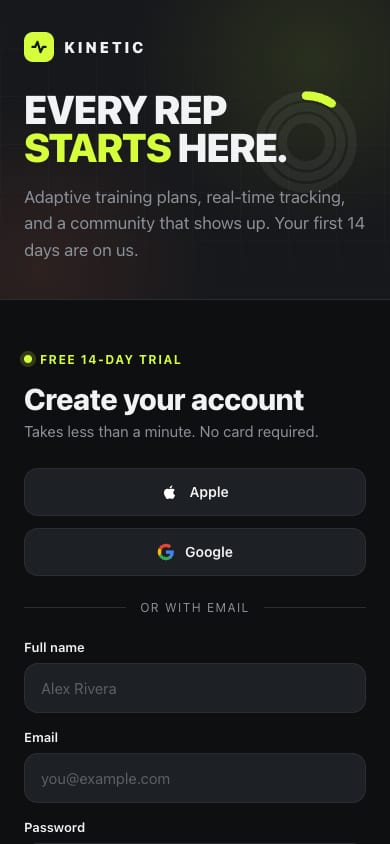
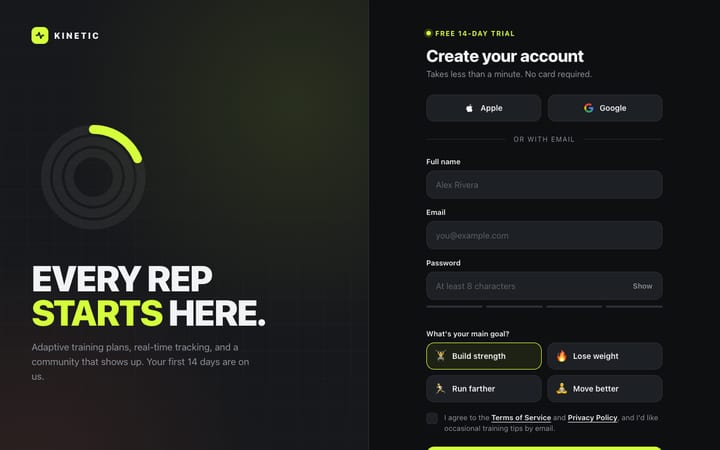
signup.html
I made signup.html, a sign-up screen for a made-up fitness brand called Kinetic. It's one file with no external dependencies. I haven't opened it in a browser, so check how it looks and behaves before relying on it.Buka langsung
Proses 2: setiap panggilan alat, berurutan
29 panggilan alat dalam 324 detik. Panggilan EpicPxls berwarna biru. Respons dipersingkat dan tautan layar bertanda tangan dihapus.
ToolSearchselect: search_items, get_item, get_item_screens, extract_paletteLoaded 4 EpicPxls toolssearch_itemsquery: "fitness app", category: "UI Kits", with_screens: true20 results (58 UI kits match). Picks: Fitnex, Fitness Mobile App UI Kit, Fitness app UI kit, 69 GymTrackerget_item_screensslug: "fitnex-mobile-app-ui-kit", limit: 842 screens in file, 25 rendered, 8 returned clean: Settings, Profile, Sleep Schedule, Sleep Tracker, Breakfast Details, Breakfast, Meal Planner, ATM Locationget_item_screensslug: "fitness-mobile-app-ui-kit", limit: 834 in file, 25 rendered, 8 returned clean: Splash, Onboarding 1-3, Get Started 1-2, Login v. 1, Registerget_item_screensslug: "fitness-app-ui-kit-e87322b1-…", limit: 827 in file, 25 rendered, 8 returned clean: Welcome ×2, Sign Up ×2, Splash ×2, Password ×2get_item_screensslug: "69-gymtracker-modern-gym-app-ui-kit", limit: 811 in file, 10 rendered, 8 returned clean: Workout ×5, Goals ×2, ReportBashcurl the 9 screen urls into ./refBlocked: needs approval in this permission modeBashcurl the 9 screen urls into ./ref (rewritten)Blocked: needs approval in this permission modeToolSearchselect: WebFetchLoaded WebFetchWebFetchFitness Mobile App UI Kit / RegisterPNG saved to disk (WebFetch cannot describe images)WebFetchFitness app UI kit / Sign UpPNG saved to diskWebFetchFitness app UI kit / Sign Up (second variant)PNG saved to diskWebFetchFitnex / ProfilePNG saved to diskWebFetch69 GymTracker / Main PreviewPNG saved to diskReadRegister.pngImage viewedReadSign Up.pngImage viewedReadSign Up (second).pngImage viewedReadProfile.pngImage viewedReadGymTracker Main Preview.pngImage viewedWebFetchFitness Mobile App UI Kit / Login v. 1PNG saved to diskWebFetchFitnex / Main PreviewPNG saved to disk (630 KB)ReadLogin v. 1.pngImage viewedReadFitnex Main Preview.pngImage viewed (1920 × 2176)Writesignup-1.htmlFile createdWritesignup-2.htmlFile createdWritesignup-3.htmlFile createdWritesignup-4.htmlFile createdEditsignup-3.html: placeholder status bar → SVG iconsFile updatedEditsignup-4.html: "Step 1 of 1" → "Pick a starter program"File updated
Konfigurasi bersih meminta izin sebelum menjalankan perintah shell, jadi kedua unduhan curl diblokir. Agen beralih ke WebFetch, yang menyimpan gambar ke disk, lalu membukanya dengan Read.
Layar yang dilihatnya
Salinan bersih dari layar yang dibuka agen. Masing-masing tertaut ke kitnya.
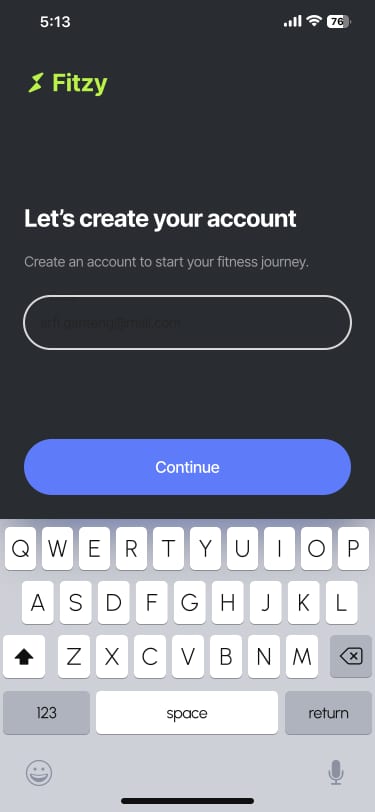

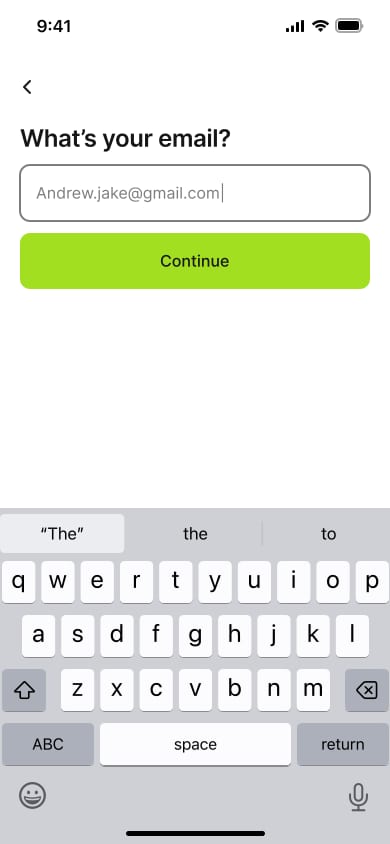

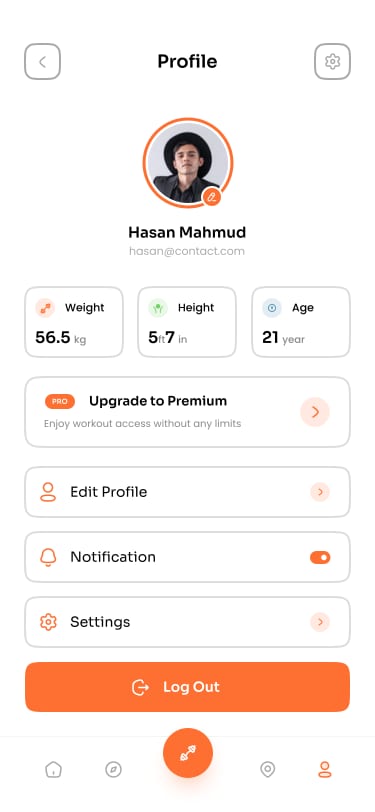
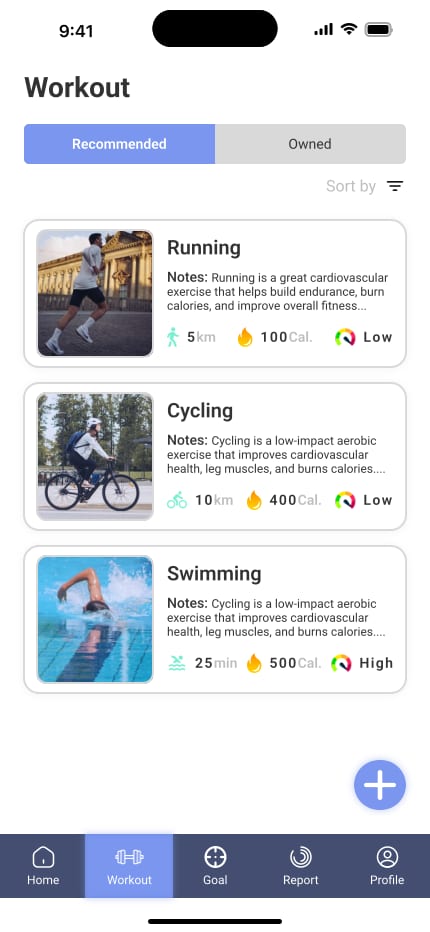
Dibuka: Main Preview (430 × 932)
Yang dibuatnya
Tangkapan layar selebar 390 dan 1280 px. Kutipannya adalah catatan agen sendiri tentang apa yang diambil dari tiap kit.
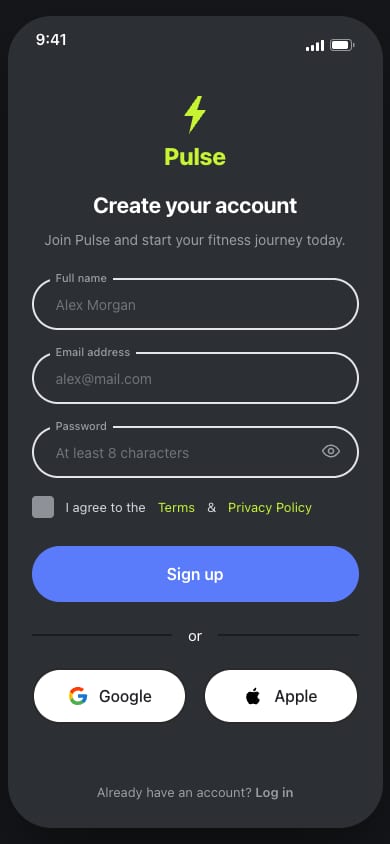
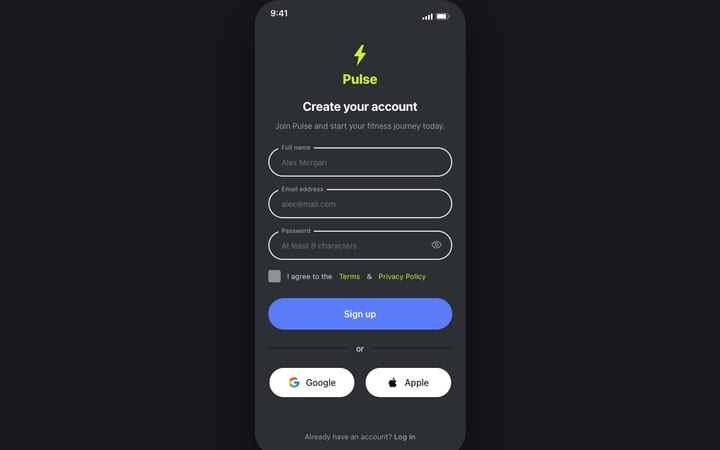
signup-1.html
Berdasarkan Fitness Mobile App UI Kit (SigmaGFX)
From its Register and Login screens: 375px wide, dark charcoal with a lime logo, centred 22px bold title, 52px fully rounded inputs with the label sitting in the border, a periwinkle 56px sign-up button, an "or" divider, and rounded Google/Apple buttons side by side.Buka langsung
signup-2.html
Berdasarkan Fitness app UI kit (Sketchwire)
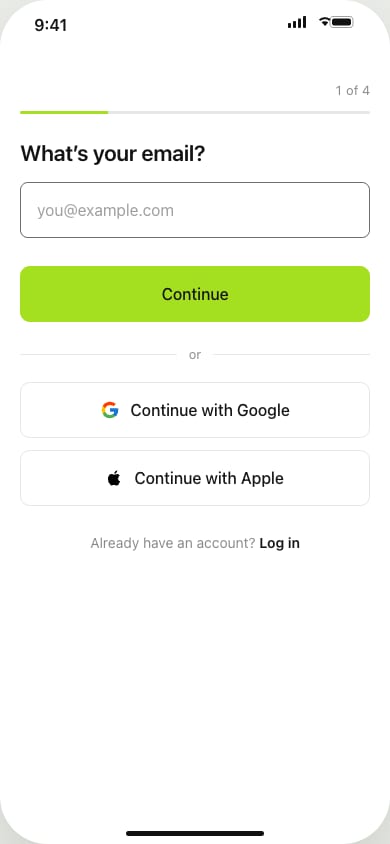
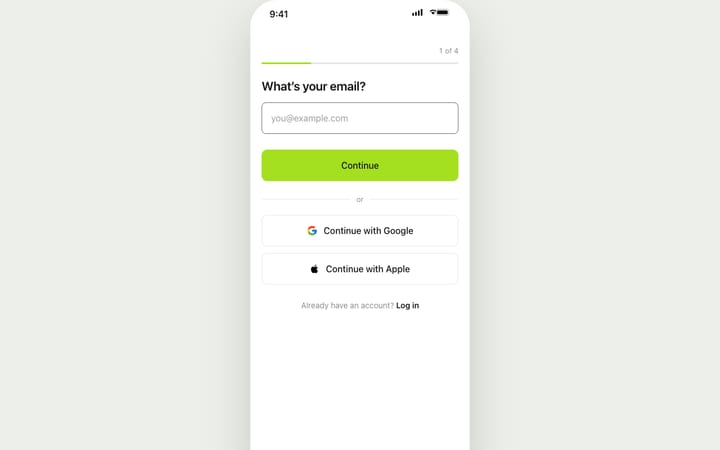
From its Sign Up screens: 390px wide, one question per screen with a back arrow, 22px semibold question, 56px input with 8px corners, and a lime 56px Continue button right under it. It runs as a 4-step flow (email → name → password with live rule checks → goal) and ends on a done screen.Buka langsung
signup-3.html
Berdasarkan Fitnex Mobile App UI Kit (SigmaGFX)
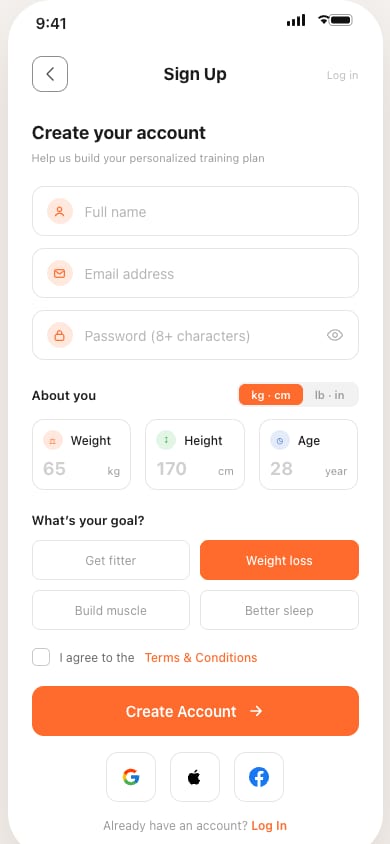
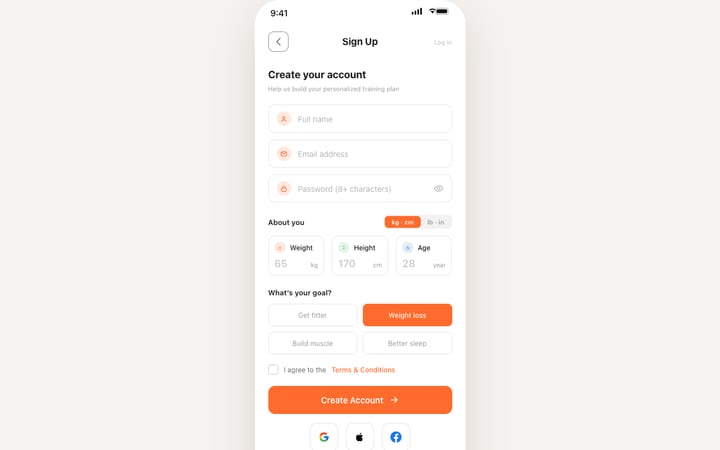
From its Profile and onboarding screens: 375px wide, white with orange #FF6B2C, a square outlined back button with a centred 17px title, an 18px heading with a small grey hint, and outlined 12px-corner fields with icons. It adds Weight/Height/Age boxes with a kg/lb switch, goal choices that fill orange when picked, and square social buttons.Buka langsung
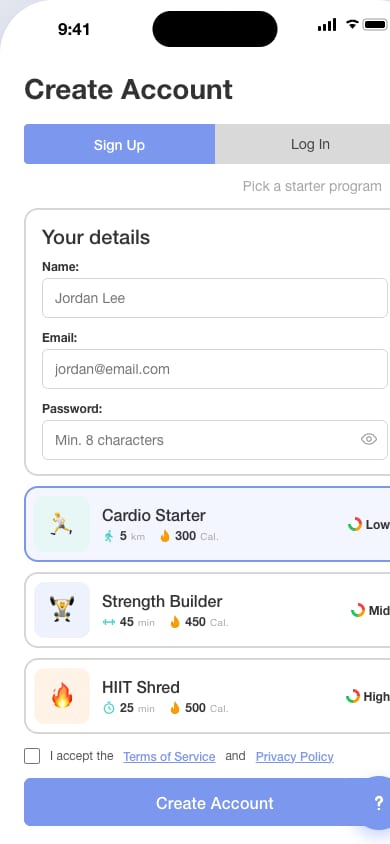
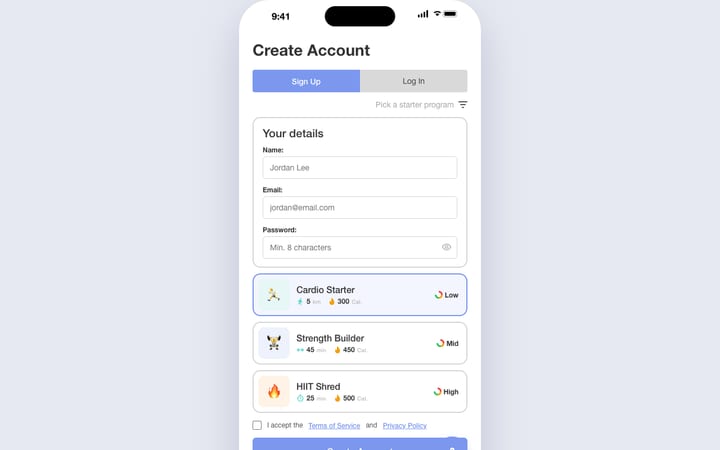
signup-4.html
Berdasarkan 69 GymTracker - Modern Gym App UI Kit (69UI)
From its Workout screens: 430px wide in Roboto, a 28px bold left-aligned title, a periwinkle/grey Sign Up / Log In toggle, cards with 2px grey borders and 14px corners, and starter-program cards with teal stats and a Low/Mid/High gauge. It also has a navy bottom bar (used here for Google/Apple/Watch sign-up) and a floating round button.
Di 390 px versi ini lebih lebar dari layar dan bergulir ke samping. Kami menampilkannya persis seperti buatan agen.
Buka langsungRingkasan akhir dari agen
Kata per kata, seperti saat ia menyelesaikan proses.
I've built four sign-up screens for a fitness app, signup-1.html to signup-4.html. Each is one HTML file with no external dependencies. I haven't opened them in a browser, so the layouts haven't been checked visually.
I found the kits with the EpicPxls search and looked at their real screens. Each file follows one kit's layout, spacing and type scale, and uses its own text and inline SVG icons (none of the kits' sample copy, logos or photos). The source kit is also noted in a comment at the top of each file.
| File | Based on | What it takes from the kit |
|---|---|---|
| signup-1.html | Fitness Mobile App UI Kit | From its Register and Login screens: 375px wide, dark charcoal with a lime logo, centred 22px bold title, 52px fully rounded inputs with the label sitting in the border, a periwinkle 56px sign-up button, an "or" divider, and rounded Google/Apple buttons side by side. |
| signup-2.html | Fitness app UI kit | From its Sign Up screens: 390px wide, one question per screen with a back arrow, 22px semibold question, 56px input with 8px corners, and a lime 56px Continue button right under it. It runs as a 4-step flow (email → name → password with live rule checks → goal) and ends on a done screen. |
| signup-3.html | Fitnex Mobile App UI Kit | From its Profile and onboarding screens: 375px wide, white with orange #FF6B2C, a square outlined back button with a centred 17px title, an 18px heading with a small grey hint, and outlined 12px-corner fields with icons. It adds Weight/Height/Age boxes with a kg/lb switch, goal choices that fill orange when picked, and square social buttons. |
| signup-4.html | 69 GymTracker - Modern Gym App UI Kit | From its Workout screens: 430px wide in Roboto, a 28px bold left-aligned title, a periwinkle/grey Sign Up / Log In toggle, cards with 2px grey borders and 14px corners, and starter-program cards with teal stats and a Low/Mid/High gauge. It also has a navy bottom bar (used here for Google/Apple/Watch sign-up) and a floating round button. |
All four check the fields before submitting, let you show or hide the password, and show a success state.
EpicPxls didn't provide a sign-up screen for Fitnex or GymTracker, so versions 3 and 4 are built from those kits' other screens. Fitzy and Sketchwire had real sign-up and login screens to follow.
The kits are paid items, so the EpicPxls terms ask you to credit the item URL if you ship something built from one.
Coba dengan prompt Anda sendiri
Terhubung dalam satu menit. Pencarian gratis, dan layar bersih tersedia dengan langganan.
Atur MCPBerlangganan untuk layar bersihDapatkan 85% dan
lebih banyak dari semua penjualan
Unggah produk Anda dan letakkan mereka
untuk dijual dengan harga berapa pun yang Anda inginkan.


